Automate Digital Sales Funnel: Save 5 Hours Weekly with Top Tools

Automating Your Digital Sales Funnel: 7 Essential Tools to Save 5 Hours Per Week Starting Today
In the fast-paced world of digital business, time is money. Every hour spent on manual, repetitive tasks is an hour not spent on strategy, innovation, or direct customer engagement. For businesses looking to scale, optimize their operations, and boost their bottom line, embracing digital sales automation is not just an option—it’s a necessity. Imagine reclaiming five hours or more each week, time that could be reinvested into high-impact activities. This isn’t a pipe dream; it’s an achievable reality with the right tools and strategies.
The concept of a digital sales funnel is well-understood: it’s the journey a potential customer takes from initial awareness of your product or service to making a purchase. However, the true power lies in automating this journey. Automation transforms a laborious, error-prone process into a smooth, efficient, and highly effective system. It ensures that no lead falls through the cracks, that every customer interaction is timely and personalized, and that your sales team can focus on what they do best: closing deals.
This comprehensive guide will delve into the world of digital sales automation, exploring why it’s crucial for modern businesses and, more importantly, introducing you to 7 essential tools that can help you achieve significant time savings and dramatically improve your sales performance. By the end of this article, you’ll have a clear roadmap to implement automation strategies that will empower your team and propel your business forward.
Understanding the Digital Sales Funnel and the Power of Automation
Before we dive into the tools, let’s briefly revisit the stages of a typical digital sales funnel and identify where automation can make the biggest impact. Generally, a sales funnel includes:
- Awareness: Attracting potential customers (e.g., through content marketing, social media, ads).
- Interest: Engaging prospects and providing more information (e.g., through landing pages, webinars, email sign-ups).
- Consideration: Nurturing leads and building trust (e.g., through targeted email campaigns, case studies, demos).
- Intent: Prospects show strong interest and are close to making a purchase (e.g., adding to cart, requesting a quote).
- Evaluation: Final decision-making stage, often involving comparisons and last-minute questions.
- Purchase: The transaction is completed.
- Retention/Advocacy: Post-purchase engagement, encouraging repeat business and referrals.
Manual management of these stages can be incredibly time-consuming. Imagine manually sending follow-up emails, updating lead statuses, scheduling appointments, or tracking every interaction. This is where digital sales automation steps in. It allows you to automate repetitive tasks, personalize communications at scale, and ensure a consistent, high-quality experience for every lead.
Why Automate Your Digital Sales Funnel?
The benefits of automating your digital sales funnel extend far beyond just saving time. Here’s why it’s a game-changer:
- Increased Efficiency: Automate mundane tasks like data entry, email sending, and lead scoring, freeing up your sales team to focus on high-value activities.
- Improved Lead Nurturing: Deliver timely, relevant content to leads at every stage of the funnel, increasing engagement and conversion rates.
- Enhanced Personalization: Despite automation, tools allow for dynamic content and segmentation, making each interaction feel personal and tailored.
- Better Lead Qualification: Automate lead scoring based on engagement and demographic data, ensuring your sales team focuses on the most promising prospects.
- Reduced Human Error: Automated processes are consistent and reduce the likelihood of mistakes that can occur with manual operations.
- Scalability: Easily handle an increasing volume of leads and customers without proportionally increasing your workforce.
- Data-Driven Insights: Automation tools often come with robust analytics, providing valuable insights into funnel performance and areas for improvement.
- Faster Sales Cycles: Streamlined processes and prompt follow-ups can significantly shorten the time it takes to convert a lead into a customer.
- Cost Savings: By reducing the need for extensive manual labor and improving conversion rates, automation can lead to significant cost efficiencies.
- Consistent Customer Experience: Ensure every customer receives the same high standard of interaction, building trust and brand loyalty.
By strategically implementing digital sales automation, businesses can not only save those precious five hours a week but also witness a transformative impact on their overall sales performance and customer relationships.
7 Essential Tools for Digital Sales Automation
Now, let’s explore the specific tools that can help you automate your digital sales funnel and achieve that coveted time saving. We’ll cover a range of categories, from CRM to email marketing and beyond, highlighting their key features and how they contribute to efficient sales operations.
1. Customer Relationship Management (CRM) Software: The Central Hub
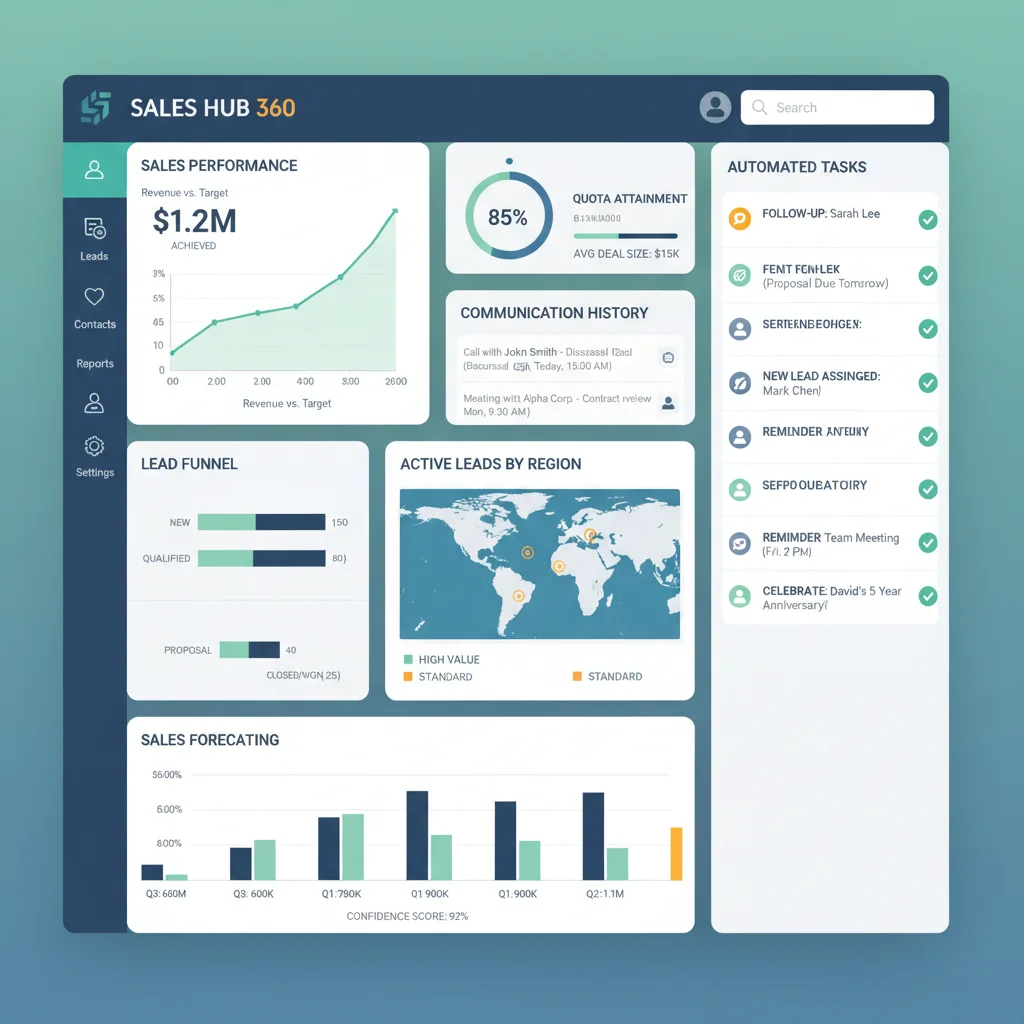
A robust CRM system is the cornerstone of any effective digital sales automation strategy. It acts as a central database for all your customer interactions, lead information, and sales activities. Automating tasks within your CRM can save countless hours.
Recommended Tools: Salesforce Sales Cloud, HubSpot CRM, Zoho CRM
- Salesforce Sales Cloud: A market leader, Salesforce offers extensive automation capabilities, from lead assignment and routing to automated follow-up tasks and email sequences. Its robust reporting and customization options make it suitable for businesses of all sizes. Salesforce can automatically update lead statuses based on interactions, assign leads to sales reps based on predefined rules, and even trigger internal notifications for critical events. The platform’s AI-powered insights, through Einstein AI, can predict sales outcomes and recommend next best actions, further enhancing automation and decision-making.
- HubSpot CRM: Known for its user-friendly interface and powerful free tier, HubSpot CRM seamlessly integrates with its marketing and service hubs. It excels at automating lead nurturing workflows, email sequences, task creation, and deal stage progression. HubSpot’s automation allows you to set up triggers based on lead behavior (e.g., website visits, form submissions) to send personalized emails or assign leads to specific sales reps. Its drag-and-drop workflow builder makes creating complex automation sequences straightforward, even for non-technical users.
- Zoho CRM: A comprehensive and affordable option, Zoho CRM offers strong automation features, including workflow rules, macros, and intelligent lead scoring. It can automate email sending, task creation, and even approval processes, streamlining the entire sales cycle. Zoho’s Blueprint feature allows you to define and enforce sales processes, ensuring consistency and compliance across your team. Its AI assistant, Zia, can help with lead prioritization and sales forecasting, adding another layer of smart automation.
How they save you 5 hours: By automating lead assignment, data entry, follow-up reminders, and reporting, CRMs significantly reduce administrative burden. Instead of manually tracking every interaction, your team has a real-time, automated overview of every lead and customer, allowing them to focus on personalized outreach and closing deals.
2. Email Marketing Automation Platforms: Nurturing at Scale
Email remains one of the most effective channels for lead nurturing and customer communication. Automation here means sending the right message to the right person at the right time, without manual intervention.
Recommended Tools: ActiveCampaign, Mailchimp, ConvertKit
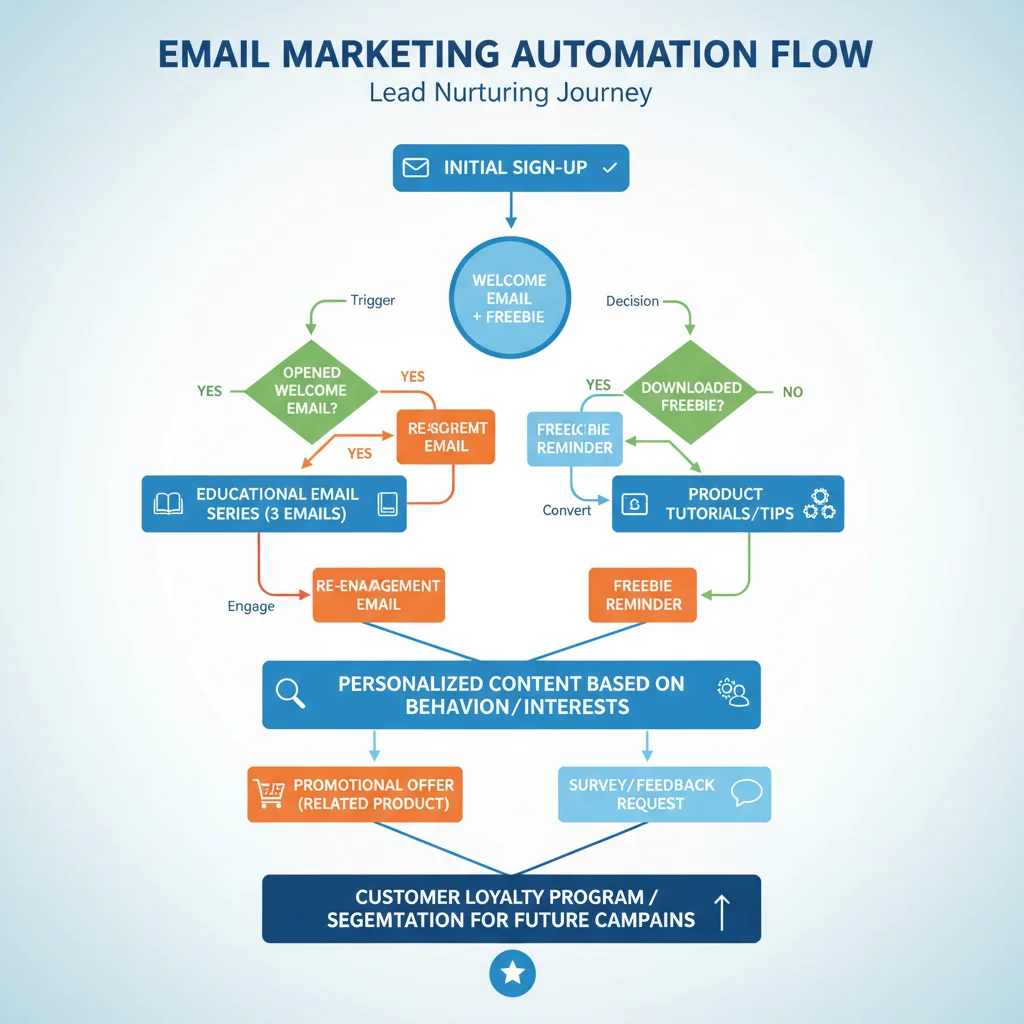
- ActiveCampaign: This platform is a powerhouse for marketing and sales automation. It offers sophisticated workflow builders that allow you to create highly personalized email sequences based on user behavior, segmentation, and lead scores. You can automate welcome series, abandoned cart reminders, re-engagement campaigns, and more. ActiveCampaign’s deep integration with CRM functionalities means you can trigger sales tasks directly from email engagement, making it a crucial tool for digital sales automation. Its visual automation builder is intuitive, allowing for complex decision trees and conditional logic to create truly dynamic customer journeys.
- Mailchimp: While often associated with basic email newsletters, Mailchimp has evolved to offer robust marketing automation features. You can set up automated customer journeys based on purchases, website activity, or list subscriptions. It’s particularly strong for e-commerce businesses looking to automate post-purchase follow-ups, product recommendations, and abandoned cart sequences. Mailchimp’s user-friendly interface makes it accessible for businesses new to automation, providing templates and pre-built workflows to get started quickly.
- ConvertKit: Geared towards creators and small businesses, ConvertKit excels in creating automated email sequences that nurture leads and build relationships. Its visual automation builder allows for simple yet powerful workflows based on tags, purchases, and form submissions. It’s ideal for delivering segmented content and sales pitches to different audience groups automatically. ConvertKit’s focus on audience segmentation and personalized content delivery ensures that each subscriber receives relevant information, increasing the likelihood of conversion.
How they save you 5 hours: Eliminating the need to manually send individual emails or segment lists for each campaign. These tools automate entire communication flows, ensuring consistent engagement and freeing up marketing and sales teams from repetitive email tasks.
3. Lead Capture & Engagement Tools: Filling the Funnel Automatically
The top of your funnel needs to be efficient. Automating lead capture and initial engagement ensures a steady flow of prospects without constant manual oversight.
Recommended Tools: OptinMonster, Leadpages, Calendly
- OptinMonster: This tool specializes in converting website visitors into leads through various types of opt-in forms, pop-ups, and slide-ins. Its automation features include exit-intent technology (triggering a pop-up when a user is about to leave your site), scroll triggers, and time-based displays. It integrates with most email marketing and CRM platforms, automatically sending new leads to your chosen system. By capturing leads effectively and automatically feeding them into your sales pipeline, OptinMonster ensures that your lead generation efforts are continuously optimized.
- Leadpages: For creating high-converting landing pages, pop-ups, and alert bars, Leadpages is an excellent choice. It offers a drag-and-drop builder and templates designed for lead generation. The automation here lies in its ability to quickly deploy conversion-focused assets and integrate seamlessly with your other automation tools, ensuring that leads captured on these pages are automatically added to your CRM or email list. This streamlines the process of creating and deploying effective lead capture mechanisms without needing web development expertise.
- Calendly: While not strictly a lead capture tool, Calendly automates the notoriously time-consuming process of scheduling meetings and demos. By allowing prospects to book a time directly from your website or email, it eliminates back-and-forth emails and ensures your sales team’s calendars are efficiently managed. This small but significant automation saves hours in coordination, allowing sales reps to focus on the actual meeting rather than scheduling logistics.
How they save you 5 hours: By automating the creation and deployment of lead capture forms and the scheduling process, these tools ensure your funnel is constantly being filled and qualified appointments are booked without manual intervention, dramatically reducing administrative time.
4. Sales Enablement & Proposal Tools: Streamlining the Close
Once leads are qualified, the next step is to present compelling proposals and close deals. Automation can make this process faster and more professional.
Recommended Tools: PandaDoc, DocuSign
- PandaDoc: This platform automates the creation, delivery, tracking, and e-signing of sales proposals, quotes, and contracts. With customizable templates and content libraries, sales reps can generate professional documents in minutes. Its automation features include dynamic content population, approval workflows, and automated reminders for unread or unsigned documents. PandaDoc integrates with CRMs, allowing for seamless data transfer and updating deal statuses automatically once a document is signed, significantly accelerating the sales cycle.
- DocuSign: While primarily known for e-signatures, DocuSign offers robust workflow automation for document management. It allows you to automate the entire signing process, from sending documents to multiple parties in a specific order to setting up reminders and archiving signed agreements. This eliminates the need for printing, scanning, and mailing, saving considerable time and reducing errors. For businesses handling a high volume of contracts, DocuSign is an indispensable tool for digital sales automation.
How they save you 5 hours: By automating document generation, review, and signing processes, these tools cut down on manual paperwork, reduce delays, and provide real-time insights into document status, allowing sales teams to close deals faster.
5. Live Chat & Chatbot Platforms: Instant Engagement & Qualification
Providing immediate support and engagement can significantly impact conversion rates. Chatbots can automate initial interactions, qualify leads, and answer common questions around the clock.
Recommended Tools: Intercom, Drift
- Intercom: More than just a live chat tool, Intercom offers a comprehensive platform for customer messaging, including chatbots, live chat, and targeted email campaigns. Its chatbots can automatically answer FAQs, qualify leads based on predefined questions, and route conversations to the appropriate sales rep when human intervention is needed. This ensures that every website visitor receives immediate attention, improving engagement and capturing leads efficiently. Intercom’s ability to personalize conversations based on user data makes it a powerful tool for enhancing the customer journey and automating initial sales interactions.
- Drift: Specializing in conversational marketing and sales, Drift uses AI-powered chatbots to engage website visitors, qualify leads, and even book meetings automatically. Its chatbots can hold intelligent conversations, guide prospects through your website, and provide instant answers to their queries. By automating these initial interactions, Drift ensures that your sales team only engages with highly qualified leads, saving them significant time and increasing their productivity. Drift’s playbooks can be customized to specific pages or user behaviors, providing a tailored automated experience.
How they save you 5 hours: Automating initial customer interactions, answering common questions, and qualifying leads 24/7 means your sales team spends less time on basic inquiries and more time on high-value conversations with genuinely interested prospects.
6. Marketing Automation Platforms: Holistic Funnel Management
While some CRM and email marketing tools offer automation, dedicated marketing automation platforms provide a more holistic approach, integrating various channels and touchpoints.
Recommended Tools: Pardot (Salesforce), Marketo Engage (Adobe)
- Pardot (Salesforce Marketing Cloud Account Engagement): Designed for B2B sales and marketing, Pardot offers powerful lead nurturing, lead scoring, and reporting capabilities. It automates email campaigns, social media posting, and landing page optimization, all while tracking prospect behavior. Pardot’s seamless integration with Salesforce CRM means that marketing and sales teams are perfectly aligned, and leads are automatically passed to sales once they reach a certain qualification score. This comprehensive approach to digital sales automation ensures a smooth transition from marketing qualified lead (MQL) to sales qualified lead (SQL).
- Marketo Engage (Adobe Experience Cloud): A robust platform for large enterprises, Marketo Engage provides advanced automation for lead management, email marketing, social marketing, and analytics. Its complex workflow capabilities allow for highly personalized customer journeys across multiple channels, automatically nurturing leads and preparing them for sales engagement. Marketo’s predictive content and lead scoring features ensure that marketing efforts are always optimized and that sales receives the most promising leads.
How they save you 5 hours: By automating complex, multi-channel marketing campaigns, lead scoring, and the handoff between marketing and sales, these platforms ensure a continuous and efficient flow of qualified leads into your sales pipeline, saving extensive manual coordination and campaign management time.
7. Integration Platforms: Connecting Your Tools
The true power of digital sales automation often lies in connecting disparate tools. Integration platforms act as the glue, allowing different applications to communicate and share data seamlessly, creating end-to-end automated workflows.
Recommended Tools: Zapier, Make (formerly Integromat)
- Zapier: A popular and user-friendly automation tool, Zapier allows you to connect thousands of web applications without writing any code. You can create ‘Zaps’ that automate tasks between your CRM, email marketing platform, lead capture tools, and more. For example, a Zap can automatically add a new lead from a form submission to your CRM, then trigger a welcome email sequence in your email marketing tool, and even create a follow-up task in your project management software. This eliminates manual data transfer and ensures information flows freely across your tech stack.
- Make (formerly Integromat): Similar to Zapier but often offering more advanced logic and multi-step workflows, Make allows you to build complex integrations between applications. It provides a visual builder to create scenarios that automate virtually any process, from data synchronization to triggering actions based on specific conditions. Make is particularly useful for businesses with unique or intricate automation needs that require more control over data flow and conditional processing.
How they save you 5 hours: These platforms eliminate manual data entry and transfer between applications. By automating the flow of information, they ensure that all your systems are always up-to-date and that actions are triggered automatically across your entire tech stack, saving hours of tedious administrative work and reducing errors.
Implementing Digital Sales Automation: A Step-by-Step Approach
Adopting digital sales automation doesn’t have to be overwhelming. Here’s a structured approach to get started and maximize your time savings:
- Audit Your Current Sales Process: Identify all manual, repetitive tasks that consume significant time. Map out your existing sales funnel and pinpoint bottlenecks or areas where leads might be falling off.
- Define Your Automation Goals: What do you want to achieve? Is it faster lead response times, better lead qualification, improved follow-up, or reduced administrative work? Clear goals will guide your tool selection and implementation.
- Start Small, Think Big: Don’t try to automate everything at once. Begin with one or two high-impact areas, such as automating lead capture and initial email nurturing. Once you see success, gradually expand your automation efforts.
- Choose the Right Tools: Based on your audit and goals, select tools that integrate well with your existing tech stack and meet your specific needs. Consider scalability and ease of use.
- Integrate Your Systems: Leverage integration platforms like Zapier or Make to ensure seamless data flow between your chosen tools. This is crucial for a truly automated and efficient funnel.
- Train Your Team: Automation isn’t about replacing your sales team; it’s about empowering them. Provide thorough training on how to use the new tools and how automation will enhance their roles. Emphasize the time-saving benefits and how it allows them to focus on more strategic activities.
- Monitor and Optimize: Automation is not a set-it-and-forget-it process. Regularly review your automation workflows, analyze performance data, and make adjustments as needed. A/B test different email sequences or chatbot scripts to continuously improve results.
- Document Your Processes: Create clear documentation for all your automated workflows. This ensures consistency, helps with onboarding new team members, and makes troubleshooting easier.
Measuring Your Time Savings and ROI
To truly appreciate the impact of digital sales automation, it’s essential to measure your time savings and return on investment (ROI). Here’s how:
- Track Time Spent Manually: Before implementing automation, track how much time your team spends on specific manual tasks (e.g., lead data entry, sending follow-up emails, scheduling appointments).
- Compare After Automation: After implementing automation for those tasks, track the time spent again. The difference will clearly show your time savings.
- Monitor Key Performance Indicators (KPIs): Look beyond just time. Track KPIs such as lead response time, lead-to-opportunity conversion rate, sales cycle length, average deal size, and customer retention rates. Automation should positively impact these metrics.
- Calculate Cost Savings: Quantify the monetary value of the time saved. For example, if you save 5 hours per week for a sales rep, calculate their hourly wage multiplied by 5. Over a year, this adds up significantly.
- Evaluate Revenue Growth: Increased efficiency and better lead nurturing often lead to higher conversion rates and increased revenue. Attribute these gains, at least in part, to your automation efforts.
By systematically measuring these aspects, you can clearly demonstrate the value of your digital sales automation investments and identify further opportunities for optimization.
Conclusion: Embrace Digital Sales Automation for a More Efficient Future
The promise of saving 5 hours per week is just the tip of the iceberg when it comes to the benefits of digital sales automation. By leveraging the right tools and strategies, businesses can transform their sales processes, making them more efficient, personalized, and scalable. From the initial lead capture to nurturing, proposal generation, and seamless integrations, the tools discussed in this guide offer powerful solutions to automate mundane tasks and empower your sales team to focus on what truly matters: building relationships and closing deals.
Don’t let manual processes hold your business back. Start exploring these essential tools today, implement automation strategically, and watch as your team reclaims valuable time, boosts productivity, and drives unprecedented growth. The future of sales is automated, and by embracing it, you’re not just saving hours; you’re building a more robust, responsive, and profitable business.